android 빌드 실패 — No connected devices
1분
FAILURE: Build failed with an exception.

* What went wrong:
Execution failed for task ':app:installDebug'.
> com.android.builder.testing.api.DeviceException: No connected devices!
yarn으로 metro 서버를 켜고 안드로이드 시뮬레이터를 켜려 하면 위 메세지를 뱉으며 빌드 실패한다.
해결한 방법
1. 디바이스 연결 확인
adb devices프로젝트 폴더에서 터미널에 입력하면 연결된 안드로이드 디바이스를 확인할 수 있다.

위 사진처럼 List of devices attached 다음 라인에 디바이스 이름이 나오지 않는다면 연결된 기기가 없는 것이다.
2. 디바이스 재연결
adb kill-server
adb start-server
순서대로 입력해 다시 연결해주고 안드로이드 스튜디오를 실행한 다음 시뮬레이터를 실행한다.
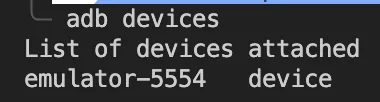
디바이스 리스트에 실행한 시뮬레이터가 뜬다.
3. run android
BUILD SUCCESSFUL in 23s
96 actionable tasks: 26 executed, 70 up-to-date
info Connecting to the development server...
다시 metro를 키고 안드로이드와 연결시켜주면 정상작동한다.